Inheriting a Codebase: What to Audit Before Taking Over a Software Project
11.03.2026
Key Takeaways
- Audit before you commit: a 1-3 week review shows what you actually inherit before you set budgets or dates.
- Check control first: confirm admin access to repos, cloud, domains and pipelines before judging code quality.
- Ask for evidence, not scores: every "good" result should be backed by a demo, a current record or a named owner.
- Six red flags change the plan: missing access, exposed secrets, untested backups, unsupported stack, untested core flows, single-person knowledge.
- Use the report to decide: what to keep, isolate or replace, with ranked risks and effort ranges.
An inherited codebase can look ready for handover while critical knowledge, access, and risks remain with the outgoing team. Commit to a budget or launch date too early, and those unknowns can become expensive changes to the plan.
This code audit checklist helps technology leaders commission a review before a takeover. It covers the evidence to request, what a sound result looks like, and the findings that should change your scope or timeline. Use it to make the next decision with a clearer view of what your team actually controls.
Why You Audit Before You Commit
A takeover estimate depends on more than the size of the backlog. The incoming team needs to know whether it can access production, reproduce a build, verify essential business flows, and understand how data moves through the system.
Without that evidence, a plan can miss work that must happen before feature development starts. An unsupported framework may require an upgrade before a planned integration. A repository may be accessible while the cloud account, deployment pipeline, or domain remains under someone else’s control. A security issue may require immediate containment.
A focused audit often takes one to three weeks, depending on the system’s size, complexity, and the access and people available. Agree on the scope up front: which applications, environments, integrations, and business processes are in the review, and which are excluded.
The audit report should document evidence and uncertainty, not just issue a health score. For a software project takeover, the output should give decision-makers a basis for the first delivery plan and identify what still needs investigation.
Ownership and Access: What You Actually Control
Before assessing code quality, confirm who controls the assets needed to run and change the system. Request an inventory of repositories, cloud accounts, domains, certificates, deployment pipelines, credentials, and third-party subscriptions. Identify the administrator and recovery contact for each.
A good result is more than a list of logins. An authorized person in your organization can manage users, recover accounts, and approve changes without depending on an outgoing employee or vendor. Sensitive credentials have a named owner and a transfer or rotation plan.
Ask legal and procurement to review intellectual property, contract terms, and software licenses. Access to a repository alone does not settle who owns or can use every component. Missing administrative control or unclear rights can delay the takeover before engineering work begins.
For the wider transition process, see how to switch software development vendors.
Architecture and Code Quality
Map the system in terms a business owner can recognize: applications, services, databases, external integrations, and the critical flows that connect them. The map should show where a change or outage in one component affects another.
A healthy result has understandable boundaries and a clear explanation of the major dependencies. It does not require every component to follow the same pattern or every line of code to be new. The team should be able to identify where the current design supports the roadmap and where it makes planned changes difficult.
Request a review of duplication, complexity hotspots, outdated frameworks, and areas where fixes repeatedly cause regressions. Connect each finding to a decision. A complex module that rarely changes may be less urgent than a fragile payment integration scheduled for expansion.
Technical debt needs the same context. Identify which shortcuts create recurring maintenance work, which can remain for now, and which must be addressed before the next milestone. An inventory without priorities can turn the audit into a rewrite wish list.
Red flags include unclear service ownership, tightly coupled components that prevent safe changes, and frameworks that no longer receive support. These findings may justify a stabilization phase, a narrower first release, or specialist review before the team estimates new features. Use the audit findings to plan how to reduce technical debt in order of business risk.
Tests, CI/CD and Release Reliability
Start with the business flows that cannot fail silently, such as payments, account access, and important data transfers. The audit should show whether reliable automated checks cover those flows and whether the team acts on failures. Recent test results provide better evidence than the mere existence of a test suite.
For poorly understood areas, characterization tests capture current behavior before changes are made. They help detect unexpected differences, but they do not prove the existing behavior is correct.
Review continuous integration and delivery alongside the tests. Can an authorized team build from a clean copy with available instructions, dependencies, and configuration? The team should be able to explain how a change moves from review to production.
Then review deployment and rollback, including when each was last exercised. Reliable releases have named owners, visible checks, and a response to failure. Undocumented steps or an unverified rollback should affect release timing and contingency planning.
Security and Dependencies
A source code audit should identify security concerns that could affect takeover plans, while making clear where a deeper security review is needed. The review should examine dependencies for known vulnerabilities, check for exposed secrets, and assess authentication and permissions around sensitive actions.
A good result includes an inventory of significant dependencies, their support status, and a process for prioritizing updates. It also shows who can access sensitive environments and whether those permissions match their responsibilities. Findings should distinguish confirmed exposure from issues that need further validation.
Secrets committed to code require a response beyond deleting the visible line. Have the appropriate security owners assess exposure and rotate affected credentials. Repository history, logs, and other copies may also need review under the organization’s incident process.
Open-source components deserve a license review as well as a vulnerability review. Have legal or the relevant compliance owner check whether the organization understands its obligations and has the information needed to meet them. Resolve unknown dependencies, excessive permissions, and unreviewed licenses before release or transfer.
Infrastructure, Data and Operations
Map hosting accounts, environments, databases, scheduled jobs, and integrations. Identify who controls and pays for each major component, and note differences between test and production that could affect releases.
A good result gives the responsible team visibility into production: monitoring identifies important failures, logs support investigation, and someone owns the response. The team can explain major infrastructure charges and identify services without clear ownership.
Review what is backed up, how often, who can access it, and when a restore was last tested. A backup record alone does not show whether restored data and applications work together or how long recovery takes. Untested recovery belongs in the initial plan.
Data quality also shapes the takeover. Identify important sources, known inconsistencies, and manual corrections. If a migration depends on records no one has reconciled, include discovery and validation before committing to a cutover.
Documentation and Team Knowledge
Documentation is useful when it reflects the system that actually runs. Compare architecture diagrams, setup instructions, runbooks, and integration notes with production evidence and conversations with the people who maintain the software.
A good result identifies which documents a new team can rely on and which need correction. It also names gaps that affect decisions: for example, an undocumented data exchange may matter more immediately than an outdated description of a retired feature.
Review the bus factor, meaning how many people would have to leave before nobody understands a critical part of the system. Identify who can explain each key integration, approve a release, recover an environment, and resolve recurring incidents. The purpose is to find knowledge concentration early enough to arrange handover sessions and record decisions.
If essential knowledge sits with one person who is about to leave, schedule transfer and verification before changing the delivery plan. The project handover checklist covers the broader information and access needed for that transition.
Red Flags That Change the Plan
Some findings can remain on a prioritized backlog. The six below should prompt a discussion about scope, budget, sequencing, or the conditions for taking responsibility.
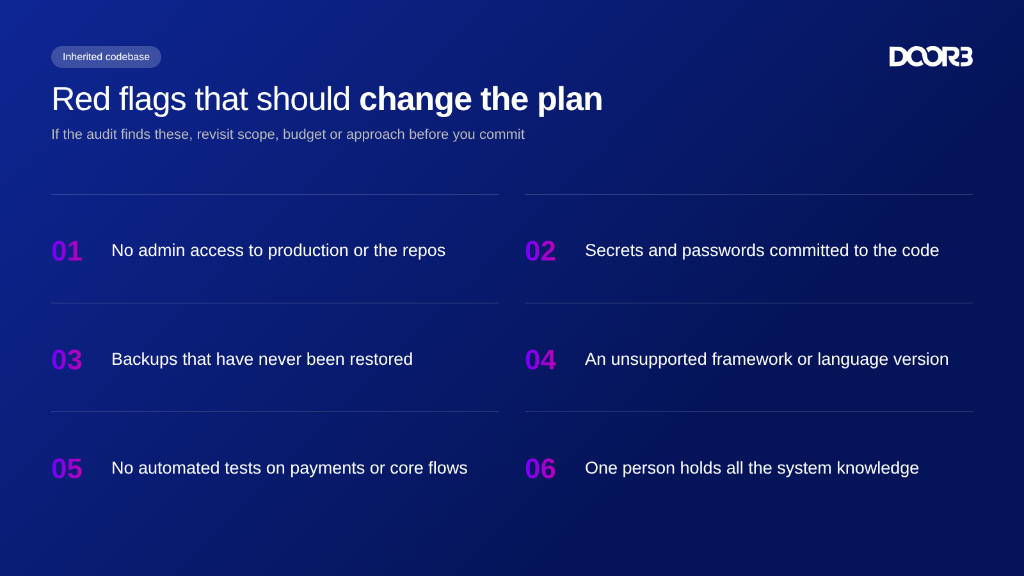
1. No admin access to production or the repos
Without administrative control, your team may be unable to manage access, recover accounts, or respond independently to an incident. Make verified access transfer a prerequisite for the takeover, and allow time for contract or account ownership issues to be resolved.
2. Secrets and passwords committed to the code
Exposed credentials may give unauthorized parties access to systems or data. Involve the security owner, assess exposure, and plan credential rotation and investigation before treating the repository as ready for routine development.
3. Backups that have never been restored
An untested backup leaves recovery time and data integrity uncertain. Add a restore exercise and remediation to the early plan, with the right infrastructure and business owners present to validate the result.
4. An unsupported framework or language version
A component without current support may create security and compatibility constraints. Assess the upgrade path and its dependencies before promising features that rely on the affected component.
5. No automated tests on payments or core flows
Changes to an unprotected business flow can create costly failures that surface only after release. Budget for checks around the most important scenarios and consider a smaller initial release while the team builds confidence.
6. One person holds all the system knowledge
A single departure or absence can interrupt releases, incident response, and future development. Arrange structured knowledge transfer and have another team member demonstrate the critical procedures before the original expert exits.
If several findings point to a system already in distress, prioritize project rescue before the planned roadmap. Use the findings to decide whether to rescue or rebuild.
The Code Audit Checklist
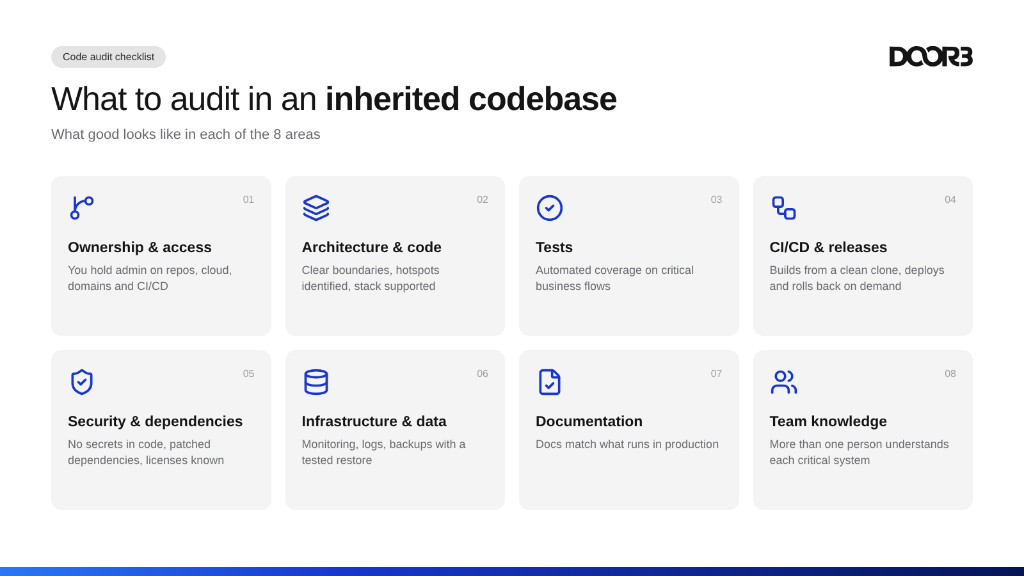
Use this overview to agree on the audit scope and review the evidence with the incoming team. A good result should be supported by a demonstration, a current record or a named owner.
Ownership & access
- Check: Repos, accounts, domains and rights.
- Good: Authorized admins and clear ownership.
- Red flag: The outgoing team holds control.
Architecture & code
- Check: Boundaries, hotspots and frameworks.
- Good: Clear dependencies and prioritized debt.
- Red flag: Changes cause widespread regressions.
Tests
- Check: Critical business flows.
- Good: Reliable automated checks on key paths.
- Red flag: Payments or core flows are untested.
CI/CD & releases
- Check: Builds, deploys and rollback.
- Good: A reproducible build and verified recovery.
- Red flag: Releases depend on undocumented steps.
Security & dependencies
- Check: Secrets, permissions, vulnerabilities and licenses.
- Good: Known dependencies and controlled access.
- Red flag: Exposed credentials.
Infrastructure & data
- Check: Hosting, monitoring, backups and data.
- Good: Visible operations and a tested restore.
- Red flag: Recovery has never been tested.
Documentation
- Check: Diagrams, runbooks and setup guides.
- Good: Documentation matches the running system.
- Red flag: Critical procedures are outdated.
Team knowledge
- Check: Owners, handover and incident response.
- Good: Multiple people understand key systems.
- Red flag: One person knows everything.
What a Good Audit Report Should Include
Start with an executive summary of the system’s condition, the most consequential risks, and whether access and evidence are sufficient to proceed. Rank findings by risk, explain the business impact, and identify evidence, affected systems, recommended actions, and decision-makers. Separate confirmed issues from assumptions and uninspected areas.
The report should recommend what to keep, isolate, or replace, with the reasoning behind each choice. Include a sequenced remediation plan with effort ranges and their assumptions. Finish with open questions, the evidence needed to narrow estimates, and who can provide it.
What Changes in Regulated Industries
Organizations handling sensitive information need the audit to preserve evidence as well as identify technical risks. Agree with compliance and security teams on which systems, data flows, and records require review before access is granted to the incoming team.
Review how personal and sensitive data is stored, transferred, and used in test environments. Review access logs and audit trails to understand whether authorized reviewers can trace important changes and access events across the handover.
Open-source license compliance also needs a clear owner. The audit should identify components and available license information so the appropriate team can assess obligations.
Finally, agree on the evidence the compliance team will need after the takeover. That may include access approvals, dependency inventories, test results, restore records, and documented decisions. Capture gaps in the remediation plan rather than assuming the incoming team can reconstruct them later.
Conclusion
A takeover plan is stronger when it reflects the system’s actual condition, ownership, and operating risks. Use the audit to establish what is safe to keep, what needs attention, and which questions must be answered before the team commits to delivery.
Talk to DOOR3 about an independent audit as part of a software project takeover, or book a free consultation to discuss the next step.


Frequently asked questions
What is a code audit?
A code audit is a structured review of software and the practices around it. Depending on scope, it can cover architecture, code quality, tests, security, dependencies, and delivery processes. For a takeover, the goal is to identify what the incoming team can rely on, what needs attention, and what remains unknown before leaders commit to a plan.
How do you audit an unfamiliar codebase?
Start by defining the business-critical flows and obtaining the access needed to inspect them. Review the architecture, code, tests, release process, infrastructure, and available documentation, then compare those findings with what the current team explains. Record evidence and gaps so leaders can decide which risks to address before delivery begins.
How long does a code audit take?
A focused audit may take one to three weeks, depending on the size of the system and the availability of access, documentation, and knowledgeable people. Complex integrations or restricted environments can extend the review. Agree on the scope and expected outputs first, and ask the team to flag access delays as soon as they arise.
What's the difference between a code audit and a security audit?
A code audit can examine maintainability, architecture, tests, and delivery practices as well as security concerns. A security audit focuses more deeply on threats, controls, vulnerabilities, and exposure within an agreed scope. One may inform the other, but leaders should confirm the depth of security review rather than assume every risk has been tested.
Can AI tools help audit a codebase?
AI tools can help reviewers explore unfamiliar code, summarize patterns, and identify areas for closer inspection. Their output still needs verification against the actual system, documentation, and test results. Before using them, confirm the organization’s rules for sharing source code or sensitive data, and keep qualified people responsible for the findings and recommendations.
What should happen after the audit?
Review the findings with engineering, security, operations, and business owners. Agree on immediate risks, unresolved questions, and which work belongs before feature delivery. Then turn the recommendations into a sequenced plan with owners, effort ranges, and decision points. Update the takeover budget and timeline when the evidence changes the original assumptions.
Should the team that built the software audit it?
The original team can provide valuable context about decisions, dependencies, and known issues. Include its knowledge in the review, but consider an independent perspective when the findings will shape a major budget, vendor transition, or remediation decision. An outside reviewer should still validate conclusions with the people who know the system.